Wave Creator Workflows: Consumer and Developer Guide
This document describes the workflows for creating, minting, publishing, and accessing knowledge projects and AI bots in the Wave ecosystem. All steps follow the official specifications for Wave Web (web.oswave.io) and Wave OS (app.oswave.io).
1. System Architecture Overview
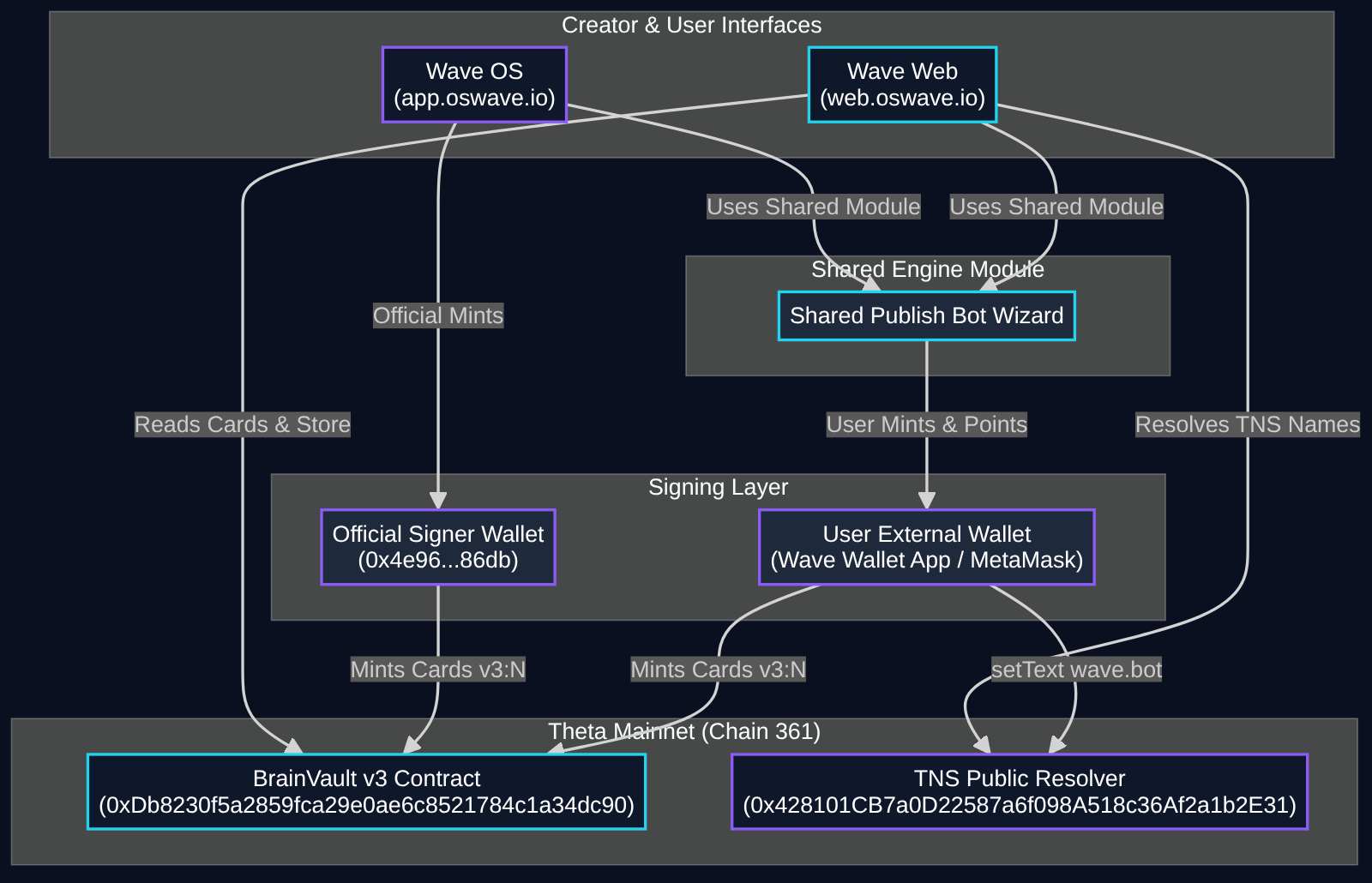
The Wave ecosystem connects web interfaces, shared publishing logic, wallet signing security, permanent on-chain storage, and domain name resolution.
System Architecture Chart
Core Components
- Wave Web (
web.oswave.io): When logged out, Wave Web operates as a read-only browser over BrainVault cards. When logged in, it acts as the Project Builder for writing cards, generating HTML pages, estimating mint costs, and publishing projects to the store. Wave Web never holds private keys, seed phrases, or handling wallet funds directly. - Wave OS (
app.oswave.io): Wave OS hosts the Bot Designer, Mascot Editor, Rules Configurator, and Bot Store interface. Official Wave bots are signed by the official Wave OS signer (0x4e96028447b653e43ff359aaff9f79c0479386db). - Shared Publish Bot Wizard: Both Wave Web and Wave OS import the exact same Publish Bot wizard module. This ensures identical UI steps, preflight checks, error messages, and TFUEL cost calculations across both platforms.
- User External Wallet: All minting and domain configuration actions require external user signatures from the Wave Wallet mobile app or MetaMask.
- Theta Mainnet (Chain 361): BrainVault v3 smart contract (
0xDb8230f5a2859fca29e0ae6c8521784c1a34dc90) stores immutable text cards, avatar designs, bot rules, and listing manifests. Cards are capped at 4 KB per card. - Theta Name Service (TNS): The public TNS resolver (
0x428101CB7a0D22587a6f098A518c36Af2a1b2E31) maps readable domain names (such aswave.theta) to bots using the text recordwave.botset tov3:<listing id>. Standard routes include the store indexweb.oswave.io/tns/bots.theta, individual bot pages/tns/bots.theta/<slug>, name resolution pages/tns/<name>.theta, and<slug>.bots.thetaredirects to the bot page.
2. Workflow A: Create and Publish a Project (Wave Web)
Workflow A covers intake of knowledge sources, card splitting, cost estimation, batch minting to Theta chain 361, and store listing inside Wave Web (web.oswave.io).
Workflow A Chart
Step-by-Step Procedure
- Intake Content: The creator submits content into Wave Web via file drag and drop (markdown, PDF, text), pasting raw text or URLs, or asking the Wave AI Assistant to draft content.
- Filter and Split Content: Wave Web filters out sensitive PII (emails, phone numbers) and blocks secret material (private keys, seed phrases, API keys). Content is automatically split into readable chunks under 2,500 bytes per card.
- Assemble and Preview: The creator organizes cards into project sections or generates custom HTML and CSS pages. Interactive previews render across mobile, tablet, and desktop viewports.
- Calculate TFUEL Cost: Wave Web measures each card's exact size and shows the total minting cost before anything is signed. On BrainVault v3 a full 2.5 KB card costs about 1.7 TFUEL, and small cards cost less (roughly 1 TFUEL).
- Connect Wallet: The creator connects an external wallet (Wave Wallet mobile app or MetaMask). Wave Web compares the estimated cost against the connected wallet balance.
- Batch Mint in Waves: The creator approves batch minting transactions in their wallet. Cards are written permanently to BrainVault v3 contract
0xDb8230f5a2859fca29e0ae6c8521784c1a34dc90. - Post-Mint Read-Back Verification: System calls
waveApi?action=check&ref=v3:<id>to verify on-chain card registration, content hash matching, and accessibility. - Publish to Store: The project is listed in the Wave Web Store index (
web.oswave.io/tns/bots.theta).
Operational Summary
- Who Does What: Creator drafts and previews content in Wave Web. Creator wallet signs transactions and pays gas. Wave Web validates, estimates, and indexes cards.
- What It Costs: Approximately 1.7 TFUEL per 2.5 KB card. Re-minting identical cards costs 0 TFUEL due to content sha256 deduplication.
- Common Errors and Fixes:
- Error: Card size exceeds 4 KB cap. Fix: Enable automatic card splitting or reduce individual card character count below 2,500 bytes.
- Error: Wallet balance short by X TFUEL. Fix: Transfer additional TFUEL into the connected wallet address before initiating batch minting.
- Error: Rejected due to detected API key. Fix: Remove hardcoded secrets from text cards before proceeding to preflight validation.
3. Workflow B: Publish a Bot with the 6-Step Wizard
Workflow B details the unified 6-step Publish Bot wizard shared by Wave OS and Wave Web.
Workflow B Chart
Step-by-Step Procedure
- Step 1: Review: Displays mascot preview, bot name, slug, pitch description, rules summary, and knowledge card count. Default values fill empty fields: 5 free questions daily, minimum paid answer price of 0.27 TFUEL total (0.15 AI cost, 0.12 owner fee, 2% Wave fee), and always open hours.
- Step 2: Preflight Checks: System validates schemas without triggering wallet prompts:
- Design: Avatar card
wave.avatar/1must have kindpixel20. Base64 pixel string must decode to exactly 400 indices, all within palette limits. - Rules: Valid
wave.rules/1structure. Paid answer calculation(owner fee + AI cost) * 1.02 >= 0.27 TFUEL. Away message 280 characters or fewer. - Listing: NAME and SLUG present. Slug formatted as lowercase alphanumeric characters and hyphens.
rulesHashmatches sha256 of rules card content. - Refs & Security: Card references use normalized format
vN:id(for examplev3:6). Cards fit 4 KB limit. Zero private secrets detected. - Name Check: Queries owner of selected
.thetaname on chain. If connected wallet does not match, displays notice:<name> is owned by 0x1234...abcd. Connect that wallet to point it at this bot, or skip this step.(This notice does not block card minting).
- Design: Avatar card
- Step 3: Cost Calculation: Itemizes total TFUEL costs for design, rules, listing, new knowledge cards, and name pointing gas. Cards with identical content sha256 are reused without re-minting. Displays wallet balance and
EnoughorShort by X TFUEL. - Step 4: Progressive Signing: Guides creator through ordered wallet prompts: Design Card -> Rules Card -> Listing Card -> TNS Name Record. Progress bar displays
Signature X of Y. If tab closes or transaction drops, state saves automatically. Reopening wizard resumes at the next unsigned item without duplicate minting. - Step 5: Point .theta Name: Executes
setText(namehash("<name>.theta"), "wave.bot", "v3:<listing_id>")on TNS public resolver0x428101CB7a0D22587a6f098A518c36Af2a1b2E31, signed by the name owner wallet. - Step 6: Live Check: Polls
https://web.oswave.io/functions/waveApi?action=check&ref=v3:<listing_id>&name=<name>.thetaevery 10 seconds for up to 5 minutes. DisplaysLIVEwith links to store page/tns/bots.theta/<slug>and name page/tns/<name>.theta, orMinted, not live: <reason>with aCheck againbutton.
Operational Summary
- Who Does What: Creator configures bot details and signs wallet prompts. Shared wizard module validates schema, calculates costs, manages signing state, and polls live status.
- What It Costs: About 4 TFUEL for a complete new bot (mascot design card about 1.7 TFUEL, rules and listing cards about 1 TFUEL each, plus about 0.25 TFUEL to point the name), plus about 1.7 TFUEL per 2.5 KB of new knowledge. The wizard always shows the exact total first.
- Common Errors and Fixes:
- Error: Mascot pixels decode to 350 values. Fix: Ensure mascot grid contains exactly 400 pixel color indices for a 20x20 canvas.
- Error: Minimum paid answer is 0.27 TFUEL. Fix: Increase combined AI cost and creator fee so total answer price equals at least 0.27 TFUEL.
- Error: Bare number ref '6' rejected. Fix: Convert legacy bare numbers to normalized format
v3:6.
4. Workflow C: Point an Existing Bot at a .theta Name
Workflow C allows pointing a previously minted bot (for example Wavey v3:6 on wave.theta) at a .theta name independently of the main creation wizard.
Workflow C Chart
Step-by-Step Procedure
- Open Bot Page: The creator opens any existing bot page in the bot application.
- Enter .theta Name: The creator types the target
.thetaname into thePoint a name at this botsection. - Verify Ownership: The application queries the TNS resolver contract for the registered owner of the
.thetaname. If the connected wallet address does not match the owner, a notice displays the owner address and prompts the user to switch wallets or skip. - Sign TNS Record Update: The connected name owner wallet prompts the user to approve a transaction executing
setText(node, "wave.bot", "v3:<listing_id>")on TNS public resolver0x428101CB7a0D22587a6f098A518c36Af2a1b2E31. - Poll Live Check: The system calls
waveApi?action=check&ref=v3:<listing_id>&name=<name>.thetato confirm record propagation. - Confirmation: Upon verification, the page displays a green
LIVEbadge with a link tohttps://web.oswave.io/tns/<name>.theta.
Operational Summary
- Who Does What: Name owner enters name and signs TNS text record transaction in their external wallet. Application verifies ownership and polls status.
- What It Costs: Standard Theta transaction gas fee (less than 0.1 TFUEL).
- Common Errors and Fixes:
- Error: Name owned by 0x1234...abcd. Fix: Switch external wallet active account to matching owner address
0x1234...abcd. - Error: TNS record points to bare address. Fix: TNS bot resolution uses text record
wave.bot = v3:<listing_id>. Do not setaddrrecord for bot linking.
- Error: Name owned by 0x1234...abcd. Fix: Switch external wallet active account to matching owner address
5. Workflow D: AI Agent Path (Recipe, Dry Run, Single Approval)
Workflow D enables AI agents to construct complete bot definitions, submit a wave.botrecipe/1 payload, perform a dry run cost estimate, and request single-click human approval.
Workflow D Chart
Step-by-Step Procedure
- Import Recipe: The system ingests a
wave.botrecipe/1JSON recipe via theImport recipeUI button or via URL query parameter?recipe=<url_to_json>. - Parse Recipe Payload: System loads bot name, slug, pitch, category, tags, target
.thetaname, design object (wave.avatar/1), rules object (wave.rules/1), and knowledge array (containing existingv3:idrefs or new card text objects). - Preflight Validation and Dry Run: The
Check onlydry run mode executes Steps 1 through 3 of the wizard without opening a wallet. It validates all schemas and calculates exact itemized TFUEL costs. - Display Approval Card: The wizard presents a single human review card displaying complete bot specs, mascot preview, rules breakdown, and total TFUEL cost.
- Human Approval: The creator reviews the generated bot spec and clicks
Approve & Sign. - Sequential Wallet Signing: The wizard prompts the creator through sequential wallet signatures (Design, Rules, Listing, Name).
- Verification and Activation: System polls
waveApi?action=checkuntil status reachesLIVE.
Operational Summary
- Who Does What: AI agent generates
wave.botrecipe/1payload. Shared wizard executes preflight checks and dry run estimation. Human user reviews preview card and signs wallet prompts. - What It Costs: Same standard TFUEL minting costs calculated during dry run phase.
- Common Errors and Fixes:
- Error: Invalid recipe schema version. Fix: Ensure recipe JSON includes
"schema": "wave.botrecipe/1". - Error: Remote recipe URL returns 404 or CORS error. Fix: Serve recipe JSON from a CORS-enabled endpoint or upload file directly via button.
- Error: Invalid recipe schema version. Fix: Ensure recipe JSON includes
6. Workflow E: How a Visitor Reaches a Bot
Workflow E illustrates how a visitor resolves a .theta name or store slug, loads verified BrainVault v3 cards, and interacts with the bot under free and paid quotas.
Workflow E Chart
Step-by-Step Procedure
- Visitor Opens Page: Visitor navigates to
web.oswave.io/tns/<name>.thetaorweb.oswave.io/tns/bots.theta/<slug>. - TNS Name Lookup: System queries public TNS resolver
0x428101CB7a0D22587a6f098A518c36Af2a1b2E31for text recordwave.bot, returning listing card pointerv3:<listing_id>(for examplev3:6). - Fetch Listing Card: System reads text card
v3:6starting withWAVE BOT LISTING, extracting bot name, slug, pitch, category, tags, creator payout,avatarRef(e.g.v3:5), andrulesHash. - Fetch Avatar Card: System reads design card
v3:5(wave.avatar/1JSON) and decodes base64 pixel string into animated 20x20 grid. - Fetch Rules Card: System reads rules card (
wave.rules/1JSON) and verifies that its computed sha256 hash equalsrulesHashin listing card. Loads daily free allowance (default 5 questions/day) and pricing rules. - Fetch Knowledge Cards: System retrieves all referenced knowledge text cards from BrainVault v3 contract
0xDb8230f5a2859fca29e0ae6c8521784c1a34dc90. - Open Bot Chat: Interface presents live chat window.
- Process User Questions:
- Within Free Allowance (<= 5 questions/day): AI processes query, cites source card IDs in response, and displays verification receipt.
- Exceeds Free Allowance (> 5 questions/day): Interface prompts user to approve TFUEL micropayment (minimum 0.27 TFUEL per answer) via connected wallet or credits balance.
Operational Summary
- Who Does What: Visitor browses store and asks questions. Client application fetches and verifies on-chain cards. AI engine streams answers citing card references.
- What It Costs: First 5 questions daily are free. Subsequent answers cost minimum 0.27 TFUEL per question.
- Common Errors and Fixes:
- Error: rulesHash mismatch. Fix: Re-mint listing card with sha256 hash matching updated rules card.
- Error: Bot offline due to hours schedule. Fix: Display away message configured in rules card.
7. Glossary of Card Types and Reference Formats
Every card stored on BrainVault v3 must follow exact specifications and schemas. Provenance metadata must always reside inside a top-level source JSON field, never as trailer text.
Card Reference Format (vN:id)
- All card references must strictly use the normalized
vN:idformat (for examplev3:6orv3:53). - Bare numbers (such as
6) are legacy references and are rejected by preflight validators.
1. Mascot Design Card (wave.avatar/1, e.g., v3:5)
- Format: JSON object.
- Schema:
{
  "schema": "wave.avatar/1",
  "kind": "pixel20",
  "palette": ["#0f172a", "#ffffff", "#22d3ee", "#8b5cf6"],
  "pixels": "<base64 encoded string of 400 palette indices>",
  "source": { "app": "wave-os" }
}- Rules:
kindmust equalpixel20. Base64 pixel string decodes to exactly 400 color indices (20x20 grid). Every index must exist in the palette array.
2. Bot Listing Card (bots:listing, e.g., v3:6)
- Format: Structured Plain Text starting with
WAVE BOT LISTING. - Example Payload:
WAVE BOT LISTING
NAME: Wavey
SLUG: wavey
PITCH: Wave OS assistant
CATEGORY: wave
TAGS: bot:wave-guide, wave-guide:bots, wave-guide:tns
PRICE TFUEL: 0
PUBLISHED BY: wave.theta- Rules: Must contain NAME and SLUG lines. Slug allows lowercase letters, numbers, and hyphens. Refers to
rulesHashandavatarRef.
3. Bot Rules Card (wave.rules/1, minted at publish)
- Format: JSON object.
- Schema:
{
  "schema": "wave.rules/1",
  "mode": "public",
  "feeTfuel": 0.12,
  "aiCostTfuel": 0.15,
  "waveFeePct": 2,
  "minAnswerTfuel": 0.27,
  "freePerUserPerDay": 5,
  "maxPerUserPerDay": 100,
  "payout": "0xcb20457aeb7ad30dbae281efbfd7c48137db1894",
  "currency": "TFUEL",
  "hours": {
    "tz": "UTC",
    "days": [0, 1, 2, 3, 4, 5, 6],
    "start": "00:00",
    "end": "23:59",
    "alwaysOpen": true
  },
  "awayMessage": "Bot is currently offline.",
  "source": { "app": "wave-os" }
}- Rules: Paid total
(feeTfuel + aiCostTfuel) * 1.02must equal at least 0.27 TFUEL. Away message maximum 280 characters.
4. On-Chain Model Manifest Card (wave.model/1, e.g., v3:53)
- Format: JSON object.
- What it holds: the model's name, its contract address on Theta (chain 361), how to call it, and its test vectors, so anyone can check the model gives the published results.
- Live example: Wave Genesis v1, manifest card
v3:53, contract0xfe33d2b4279ec269f4beca499c7a7b704ab54397. - Trust: model cards are trusted by their creator (the signer), never by the author label.
5. AI Bot Recipe (wave.botrecipe/1)
- Format: JSON object.
- Schema:
{
  "schema": "wave.botrecipe/1",
  "name": "Wavey",
  "slug": "wavey",
  "pitch": "Your interactive guide to Theta network.",
  "category": "Education",
  "tags": ["theta", "assistant"],
  "name_to_point": "wave.theta",
  "design": {
    "schema": "wave.avatar/1",
    "kind": "pixel20",
    "palette": ["#0f172a", "#ffffff", "#22d3ee", "#8b5cf6"],
    "pixels": "<base64 encoded string of 400 palette indices>"
  },
  "rules": {
    "schema": "wave.rules/1",
    "mode": "public",
    "feeTfuel": 0.12,
    "aiCostTfuel": 0.15,
    "waveFeePct": 2,
    "minAnswerTfuel": 0.27,
    "freePerUserPerDay": 5,
    "payout": "0xcb20457aeb7ad30dbae281efbfd7c48137db1894",
    "hours": { "alwaysOpen": true }
  },
  "knowledge": [
    "v3:12",
    { "title": "Overview", "text": "BrainVault is permanent on-chain storage." }
  ],
  "engine": "llm"
}
8. Frequently Asked Questions (FAQ)
Q1: Why does a .theta name need its owner to sign during publishing?
The TNS public resolver (0x428101CB7a0D22587a6f098A518c36Af2a1b2E31) enforces on-chain ownership. Executing setText(node, "wave.bot", "v3:<listing_id>") changes the official domain record for <name>.theta, so the transaction must be signed by the wallet that owns the name. If a different wallet is connected during wizard step 5, the wizard shows an ownership notice with the owner address and allows skipping name resolution while keeping all minted cards intact.
Q2: What does "Minted, not live" mean?
"Minted, not live" indicates that all bot cards (mascot avatar, rules, listing, knowledge) are successfully written to the BrainVault v3 contract on Theta chain 361, but the live endpoint verification (waveApi?action=check) has not yet confirmed the TNS wave.bot pointer or domain propagation. Clicking "Check again" re-polls the live status endpoint.
Q3: What is a dry run in the Publish Bot wizard?
A dry run is triggered via the "Check only" button in the wizard or during AI recipe ingestion. It runs steps 1 through 3 (Review, Preflight Schema Checks, and Cost Calculation) without prompting for wallet signatures or spending TFUEL. It validates all card payload schemas and calculates an exact itemized cost breakdown.
Q4: What does publishing a bot cost?
Publishing a new bot costs about 4 TFUEL: the mascot design card (about 1.7 TFUEL), the rules and listing cards (about 1 TFUEL each), and about 0.25 TFUEL to point the name. New knowledge cards add about 1.7 TFUEL per 2.5 KB. The wizard shows the exact itemized total before you sign. Cards with identical content sha256 hashes are automatically reused, costing 0 TFUEL for duplicate minting.